
Letting an AI agent touch the content tree, carefully

When an AI agent changes C# in our ten-year-old Sitecore solution, three safety nets catch a mistake before it matters. Git shows a diff, the compiler fails the build, and a test goes red. When the same agent changes a Sitecore item, only the diff is left, and it comes late. The change lands in the master database first and is live on the CM right away. The diff only appears once the agent serializes the item, and it shows a stored value in a YAML file, not whether Sitecore can use it. There is no build, and often there is no error either. The change looks fine and can break something downstream weeks later.
An agent changes content with the same tools a developer uses: Sitecore PowerShell Extensions (SPE), content serialization and the CM itself. Nothing in the platform treats an agent differently from a developer, so the guardrails can't come from the platform. Ours are rules about verification and ownership, written down where the agent reads them.
1. Rules in place of a compiler and tests
Most of these rules live in the instructions of our Sitecore specialist, a subagent with its own brief that gets every Sitecore task. Behind nearly every one is something that went wrong.
Rule 1: Check how Sitecore uses a write
Reading a field back after a write proves nothing. Early on, the agent added a base template by appending a GUID to the __Base template field, separated by a newline where Sitecore expects a pipe. The raw read showed every GUID, and the diff of the serialized file looked clean. Yet template inheritance was broken, and a CM restart did not fix it, because the stored value itself was wrong. Since then, every base-template change ends with a structural check:
[Sitecore.Data.Managers.TemplateManager]::GetTemplate($item).GetBaseTemplates() |
    ForEach-Object { $_.Name }
If the new base is missing from that list, the write was wrong, however right the field looks.
Rule 2: Never write serialized items by hand
The agent changes items inside Sitecore and then serializes what Sitecore wrote. It never writes or edits a serialized .yml file itself. Those files are the only diff we get for content, and we can trust them only if Sitecore wrote them.
Rule 3: Commit only your own items
A serialization pull writes out everything that changed on the CM, including other people's work, so the diff after a pull is never just the agent's own. One pull on a shared CM brought in a colleague's unfinished changes and a live chat-widget API key that someone had pasted into a settings item. So the agent never commits a pull as a whole with git add -A. It stages the items it changed and leaves everything else to its owner. When a pull brings the API key back into the serialized files, the agent clears it again before anything is committed.
Rule 4: Leave what can't be undone to a person
Some actions the agent can't take back on its own. It doesn't publish, restart a container or touch the databases directly unless a person asks for it.
None of this is clever. A careful developer does all of it without thinking. We wrote it down because the agent starts every session without the lessons of the last one.
2. The way in changed, the rules did not
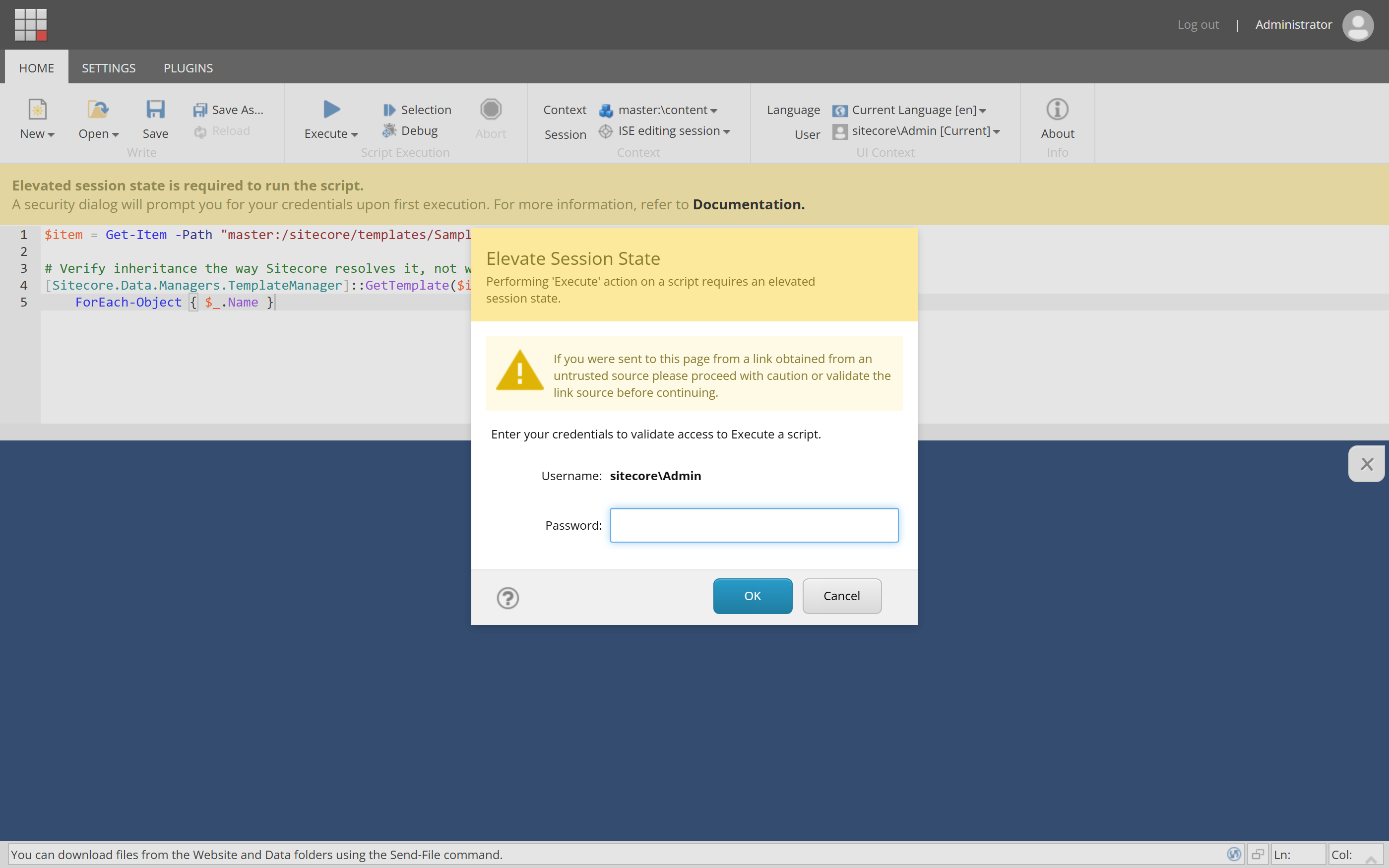
How does an agent change items inside Sitecore? For the first two months, it did what I would do and opened a browser. The agent drove Chrome through the DevTools protocol, typed its script into the editor of the SPE PowerShell ISE, confirmed the elevation dialog SPE shows on the first run, and read the results back out of the page. It was clumsy, but it worked, and it used the same entry point and the same permissions as a human.
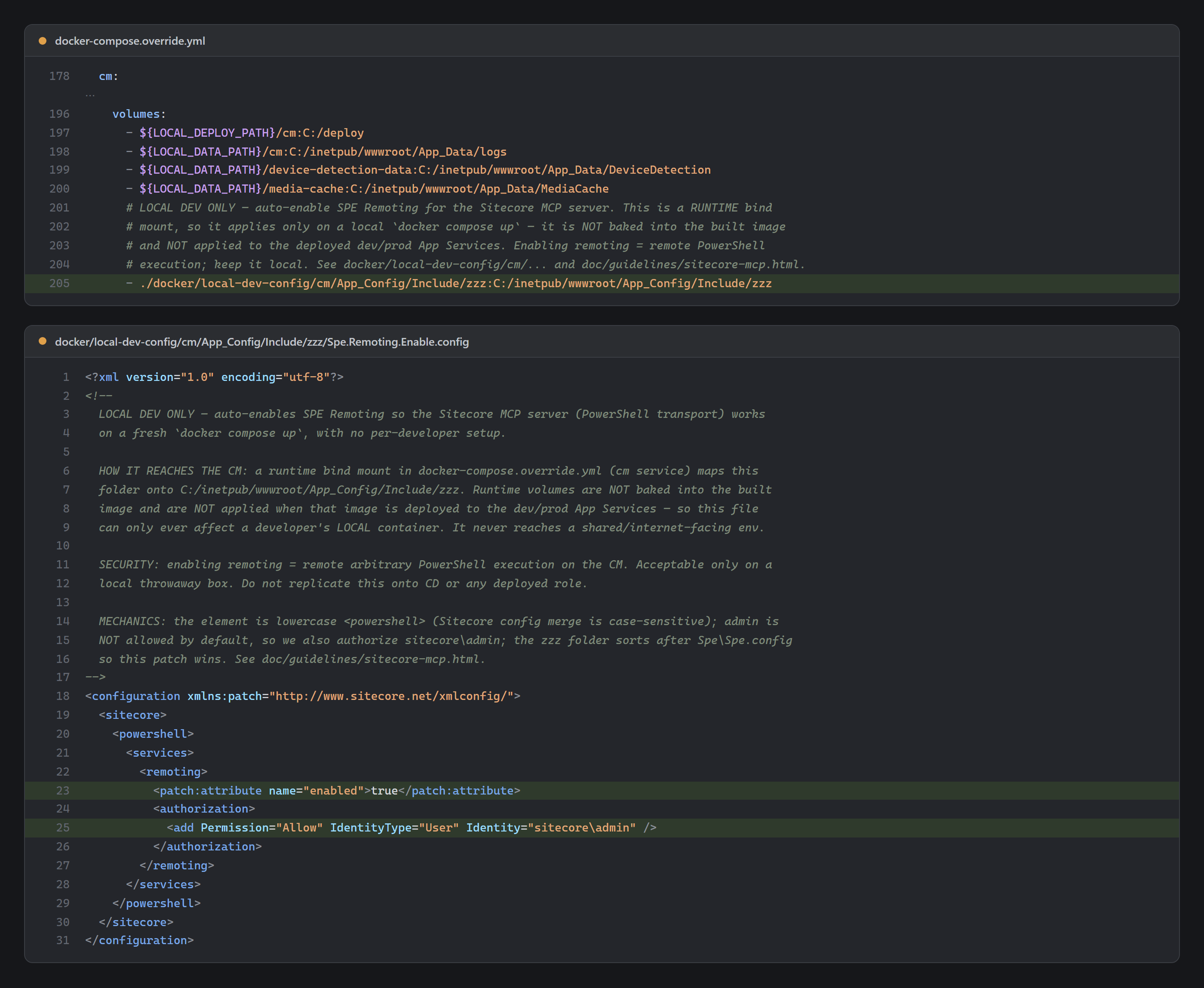
Then we moved to a community MCP server for Sitecore, @antonytm/mcp-sitecore-server. MCP (Model Context Protocol) is an open standard for giving an agent tools, and one entry in .mcp.json gave ours a direct channel into the CM. The server can reach Sitecore in three ways: the GraphQL authoring API, the Item Service and SPE Remoting. We switched on SPE Remoting, which runs the same PowerShell the agent had been typing into the ISE.
We enabled remoting for local development only. docker-compose.override.yml bind-mounts a config patch into the local CM container, so the patch exists when the local stack starts and never ends up in a built image, on dev or on production. SPE Remoting is remote code execution by design, and it has no place on a deployed CM.
The agent's way in changed completely, from a browser typing into a web page to a direct API call. Not one rule had to change, because each rule describes the result the agent leaves behind, whichever way it took into the CM. Base templates still get the structural check, nobody writes .yml by hand, the agent still stages only its own items, and it still leaves publishing to a person. We spelled this out in the specialist's instructions anyway. A direct channel into the CM can look like permission to do more with it, so the instructions say that every rule applies to MCP calls exactly as before.
3. What I found in our session history
Besides the tool that runs PowerShell scripts, the MCP server offers more than a hundred typed tools. Each one does a single named job, like reading an item or adding a rendering to a page, and takes fixed parameters instead of a script.
I expected them to take over, since a typed get-item call is much easier to approve than a free-form script. When I went through our session history for this post, 90% of our agents' Sitecore MCP calls were still PowerShell scripts. The few times they tried the typed tools, 15 of 16 calls failed.
I hadn't noticed, because the work still got done. After each failure the agent found another way and carried on. Nobody had decided against the typed tools. They didn't work, and the agent worked around them.
The detour probably cost some efficiency, since a script is more to write and more to review than a typed call. The result was the same, though. Every change still followed the rules. The agent made it inside Sitecore, checked how Sitecore uses it, and committed only its own items. The guardrails held because none of them depended on which tool the agent used.
The cause was in our own code. We have fixed it, and the typed tools for the Item Service work now.
Summary
Code changes come with a diff, a compiler and tests. A Sitecore item change has no compiler and no tests, and it is live before its diff appears. That diff shows a stored value, not whether Sitecore can use it. So our agent works by four rules. It checks how Sitecore uses a write, never writes serialized items by hand, commits only its own items and leaves what it can't undo to a person. Its way into the CM has changed once already, from a browser to an MCP server, and the rules didn't have to change with it. I expect them to hold as the agent starts using the typed tools too.
Every one of these rules assumes that the agent works against a local CM it can break without hurting anyone. That means the whole platform has to run next to the agent: SQL, Solr, CM, CD and identity. The next post, "Giving the AI agent its own machine", is about where that platform runs.